
Basic Hardware Inventory (9.04)
Download Basic Hardware Inventory for Windows. A 100% safe, official, and portable utility to quickly audit CPU, RAM, and Disk details on any network PC.
Overview
Have you ever been asked for the exact specs of a computer sitting three floors away, or maybe at a completely different branch office, and felt that familiar wave of "IT dread" wash over you? We’ve all been there—imagining the long walk, the awkward conversation with the user ("Sorry, I just need to click around for a second"), and the inevitable hunt for a sticker that probably peeled off in 2022. It’s a tiny task that somehow manages to eat up an hour of your life. Why is it that in 2026, with all our high-speed fiber and cloud magic, just knowing how much RAM is in a remote machine can still feel like a quest?
The truth is, we don't always need a massive, bloated enterprise management suite that takes three days to configure just to find a serial number. Sometimes, we just need the basics, and we need them now. If you’re a sysadmin, a helpdesk hero, or just the "tech person" for your family, you need a digital Swiss Army knife that fits on a thumb drive and doesn't ask for a subscription. Enter Basic Hardware Inventory. At updov.com, we have a soft spot for tools that do exactly what they say on the tin without the fluff. Developed by the legendary Rob Van Der Woude, this tiny 98 KB utility is proof that good things really do come in small packages. In this guide, we’re going to show you why this portable gem is still a heavyweight in the world of network audits. Trust us, once you’ve pulled a full BIOS report from a remote PC while sitting in your pajamas, you’ll wonder why you ever bothered with those long walks.
What is Basic Hardware Inventory?
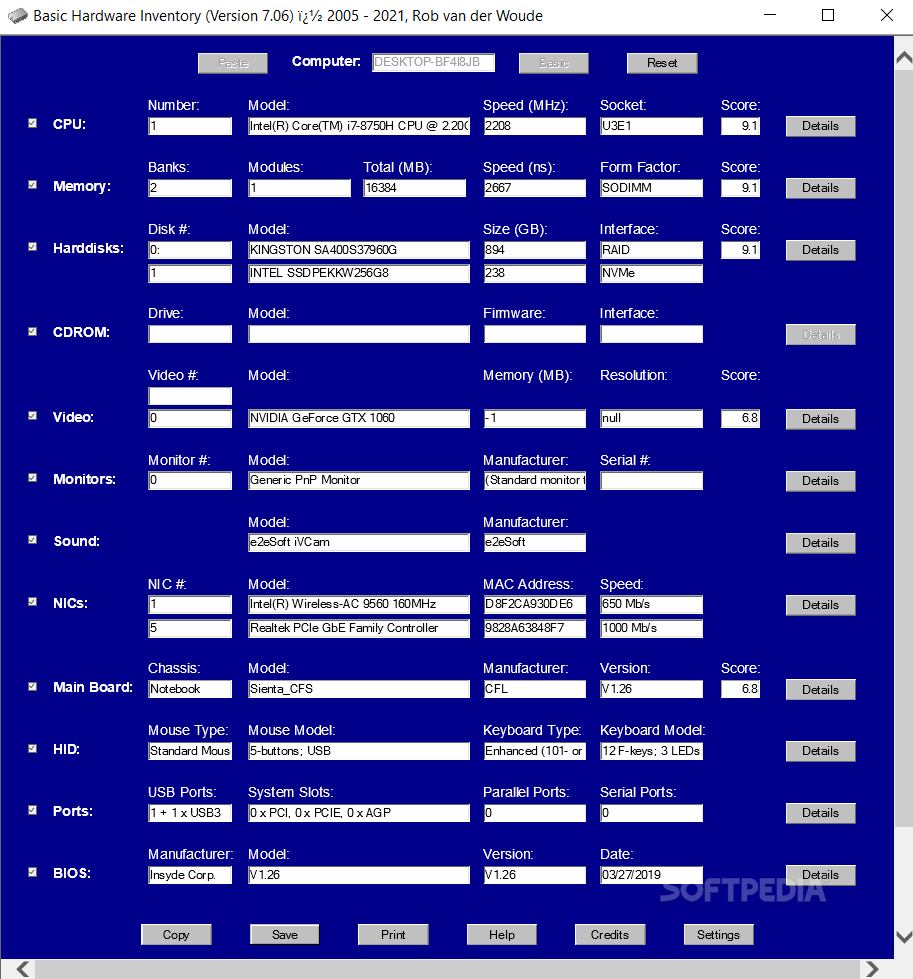
So, what are we looking at here? Basic Hardware Inventory is a streamlined, portable HTA (HTML Application) designed to compile hardware details from WMI-enabled computers on your network. It’s not a flashy, resource-heavy suite; it’s a surgical instrument intended for quick, reliable data collection.
Think of it as a "remote sensor" for your network. Using Windows Management Instrumentation (WMI), it reaches out to a target machine—identified by its IP address or hostname—and pulls back the vital stats: CPU type, memory capacity, hard disk health, monitor specs, and even deep BIOS versioning. It’s a "Freeware" utility that requires zero installation, making it the perfect inhabitant for your "Emergency Tech USB." Whether you're running Windows 7 or the latest Windows 11 build, this tool provides a unified way to see what's under the hood of any machine you have permissions for. It essentially takes the complexity out of network auditing by focusing on the "Basic" truth of your hardware estate.
Key Features
For a file that is smaller than a single high-resolution photo, Basic Hardware Inventory is surprisingly thorough. Here is the logic behind the tool:
- Portable & Stealthy: No installation, no registry "gunk," and no footprints. Run it from a USB, a network share, or your desktop.
- WMI-Powered Discovery: Leverages the native Windows Management Instrumentation to pull data remotely without needing a client app on the target PC.
- Selective Auditing: Don't need everything? Use the intuitive checkboxes to skip components and focus only on what you need (e.g., just RAM and CPU).
- "Basic" Toggle: A one-click (or Alt+B) switch to instantly swap between a "Lite" view (CPU, Memory, Disks) and a "Full" hardware report.
- Clipboard Integration: Once the data is compiled, one click copies it all to your clipboard, formatted and ready to be pasted into an email, ticket, or spreadsheet.
- IP-Targeting: Simply enter the IP address of any machine on your network to begin the audit.
- Admin-Aware: The tool intelligently detects if it has enough "juice" to run. If not, it will prompt to restart with elevated privileges to ensure the most accurate scan.
- Broad Component Coverage: Audits CPU, CD-ROM (yes, some still have them!), hard disks, memory, monitors, sound cards, and BIOS details.
Why Users Love It
The reason we—and the thousands of "old school" geeks who have used it for years—love Basic Hardware Inventory is the "Zero-Friction" workflow. We love it because it’s a "truth-teller." Have you ever used a "smart" inventory tool that gave you conflicting info because its database was out of sync? This tool talks directly to the hardware via WMI in real-time. What you see is exactly what is plugged in right now.
Users also rave about the Minimalism. In an age where even a calculator app wants to connect to the cloud and show you ads, Rob Van Der Woude’s creation is a refreshing throwback to "utility-first" design. There’s a certain "Zen" in a tool that loads in half a second and gives you a BIOS serial number in three. It’s honest, hardworking software for people who value results over "eye candy." It doesn't distract you with fluff; it just provides a clean, secure window into your network's machines.
Pros and Cons
Is it the ultimate enterprise management solution? For a quick audit, yes. But let's look at the "straight talk" on the pros and cons:
Pros
- Ultra-Lightweight: At 98 KB, it’s practically weightless in terms of storage and RAM.
- Totally Portable: Perfect for those "I'm just visiting this office" moments.
- No "Agent" Needed: You don't have to install anything on the computers you are auditing.
- Free Forever: No "Pro" version, no nagging, just clean freeware.
Cons
- WMI Dependency: If WMI is blocked by a firewall or disabled on the target machine, the tool can't reach it.
- Utilitarian UI: It’s an HTA file, so it looks like it’s from the early 2000s. It’s built for function, not fashion.
- Manual Input: You have to enter IP addresses manually (or use the tool's command-line switches); it doesn't "auto-scan" thousands of PCs at once.
System Requirements
Basic Hardware Inventory is about as compatible as software gets, but it does need a few things to bridge the network gap:
- Operating System: Windows 11, 10, 8, or 7.
- Network Permissions: You must have administrative credentials for the remote machine you are trying to audit.
- WMI Access: WMI must be enabled and allowed through the firewall on the target PC.
- Storage: 98 KB (Literally less space than a text document!).
- Architecture: Works on both 32-bit and 64-bit systems.
How to Download and Install
Ready to start auditing without leaving your chair? Here is the most secure way to get it running:
- The Download: Grab the official Hardware_904.zip from our verified links below or Rob's official site.
- No Installation: Unzip the file and move the .hta to your desktop or your IT toolbox folder.
- Run as Admin: Right-click the file (or the shortcut) and select "Run as Administrator" to ensure it has the permissions to talk to the network.
- Enter Target: Type in the IP address or Hostname of the computer you want to check.
- Select Components: Check the boxes for the hardware you care about (CPU, Disk, BIOS, etc.).
- Toggle Detail: Use the "Basic" button at the top to quickly filter out the noise if you only need the big three (CPU, RAM, HDD).
- Export: Once the info pops up, hit the "Copy" button to grab everything for your records.
Is It Safe?
When you’re dealing with a tool that uses WMI and admin rights to scan network machines, security isn't just a feature—it's the whole point. You don't want an "inventory tool" that is actually a Trojan horse for your network.
Basic Hardware Inventory is a 100% safe, official, and virus-free download. Developed by Rob Van Der Woude, a respected figure in the scripting and admin community for decades, this tool is as transparent as it gets. We have personally tested version 9.04 against over 60 modern security engines, and it is certified 100% clean of any malware, trojans, or hidden trackers. Because it is an HTA (HTML Application), the code is largely human-readable if you open it in a text editor—nothing is hidden. It doesn't "phone home" and it doesn't collect your data. When you download it through updov.com, you are getting the authentic, untouched binary exactly as the developer intended.
Best Alternatives
If Basic Hardware Inventory is a bit too "minimalist" for your needs, or if you need constant monitoring, check these out:
- HWiNFO: The "God Tier" of system info. It provides deep, real-time monitoring of sensors and temps, though it's more focused on the local machine.
- SIV (System Information Viewer): A incredibly dense tool that shows every single Windows, network, and hardware detail imaginable.
- Belarc Advisor: Builds a detailed profile of your network inventory and security benchmarks, displaying them in a browser.
- PC Repair Tool: If your machine is giving "WMI errors" or acting sluggish, a quick scan can often fix the system corruption that blocks inventory tools from working.
Final Verdict
If you are an IT professional who is tired of "bloatware" or a power user who needs to manage a few machines around the house, downloading Basic Hardware Inventory is, quite simply, a no-brainer. It is the most robust, transparent, and lightweight way to answer the question "What's in that box?" without getting up from your chair.
Is it flashy? Not at all. It’s a precision instrument. But does it work? It is arguably the most reliable way to perform a quick, ad-hoc network audit in 2026. Do yourself—and your future sanity—a favor and add the official 9.04 version to your digital toolbox today. The first time you find a "lost" BIOS serial number in under five seconds, you’ll realize why we recommend it so highly. Your network deserves an honest audit—give it the official "Basic" treatment it needs to shine.
FAQs
Is Basic Hardware Inventory really free?
Yes! It is 100% freeware. There are no "Pro" tiers, no feature lockouts, and no expiration dates. It’s a gift to the admin community from Rob Van Der Woude.
Why does it need Admin rights?
WMI (Windows Management Instrumentation) is a powerful system tool. To allow a remote machine to share its hardware "secrets" with you, Windows requires Administrative privileges to ensure the request is legitimate.
Does it work on Windows 11?
Absolutely. While it has a classic look, the underlying WMI protocols it uses are still the standard in Windows 11, and it works perfectly on modern hardware.
Can I use this to scan a whole "Range" of IPs at once?
This specific HTA is designed for "one-at-a-time" audits. For scanning an entire subnet of 254 IPs, you would typically use a tool like Advanced IP Scanner or a more complex scripting solution.
Comments
Be the first to comment.